GrowSpace
FACTORY SAFETY · UWB RTLS

See the danger on your floor —
before it becomes an accident

Forklift collisions, unauthorized zone entry, headcount at check-in/out, and abnormal movement —
all on one GrowSpace map dashboard, detected and alerted in real time.
Serious Accidents Punishment Act compliance shouldn't be a burden you carry alone — we share it across your factory, distribution center, and construction site.

Get a Safety Assessment →

From diagnosing hazard zones to reviewing available government support — we cover it all in one consultation

Support in reviewing government smart-safety-equipment grants · proven track record in manufacturing, logistics, construction, and steel sites

Positioning technology validated on large-scale manufacturing, logistics, and steel sites Deployed at a finished-vehicle logistics center Worker monitoring at a semiconductor fab Indoor positioning at a steel mill Patents held in positioning technology
THE PROBLEM · SYSTEM RESPONSE

The risks that are easy to miss on-site,
confirmed with location data

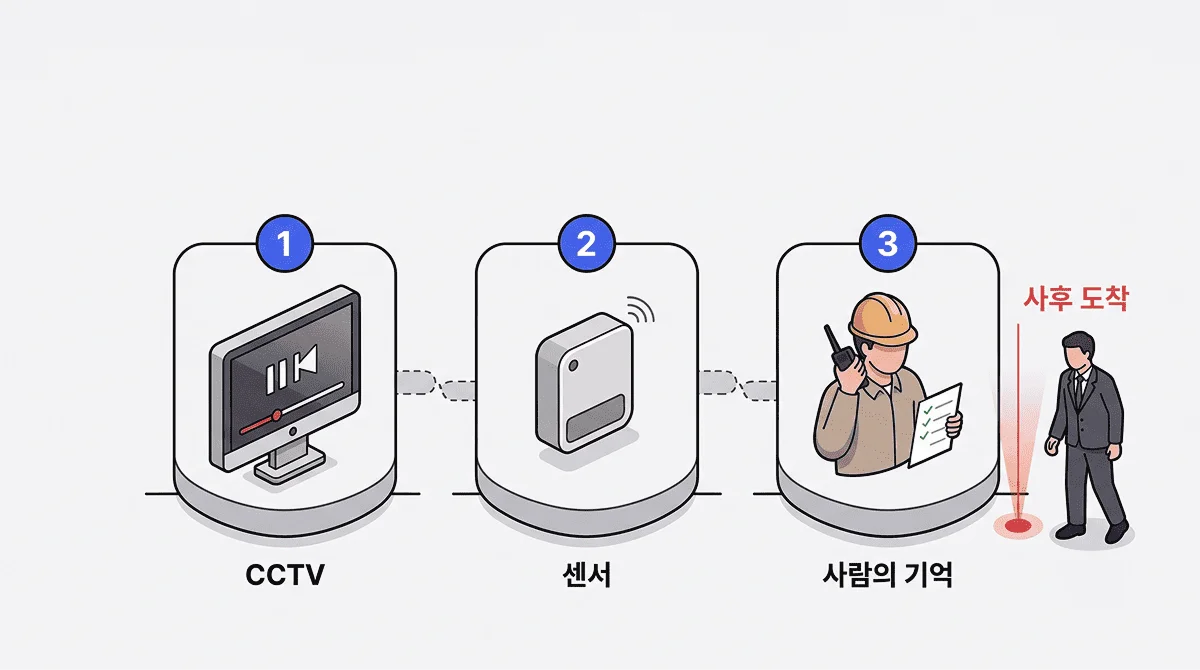
CCTV footage only gets reviewed after an accident happens.
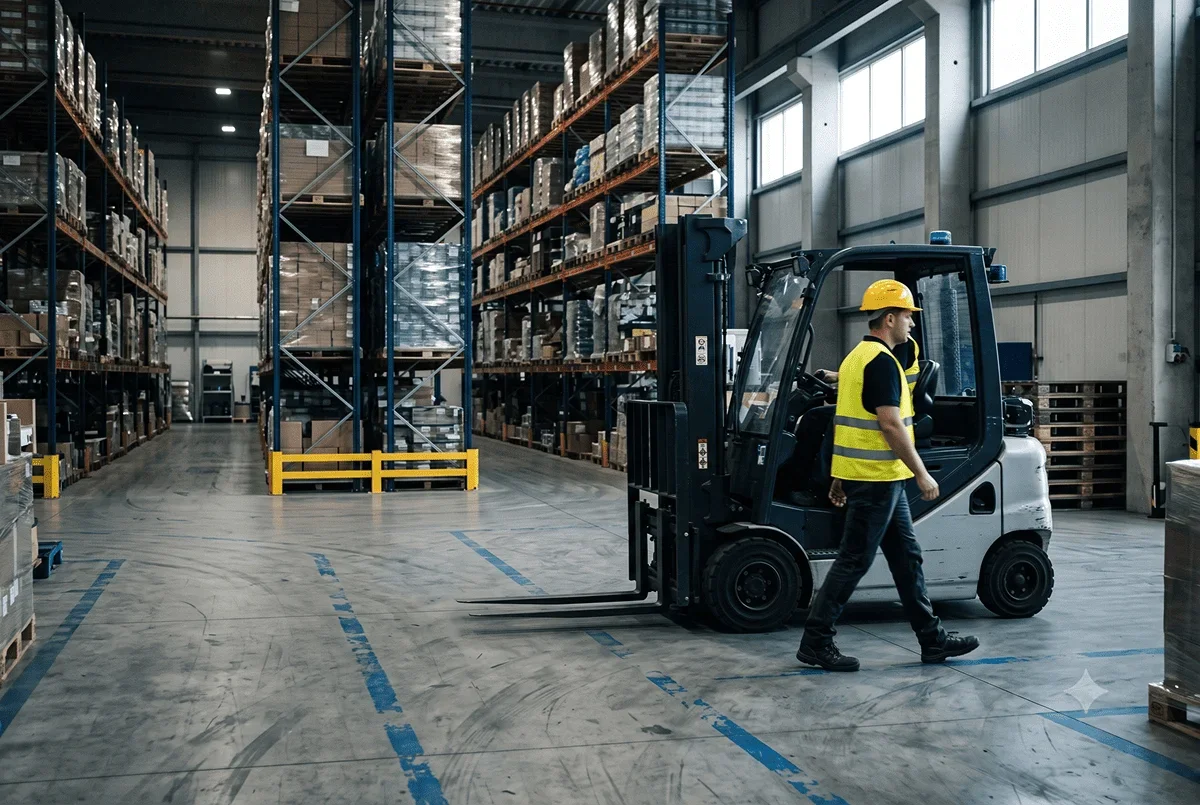
A radio and a paper checklist can't tell you which worker a forklift is passing right now.
When safety data is scattered across CCTV, sensors, and people's memory, managers always arrive after the fact.

Safety data scattered across CCTV, sensors, and people's memory — pieced together only after the fact

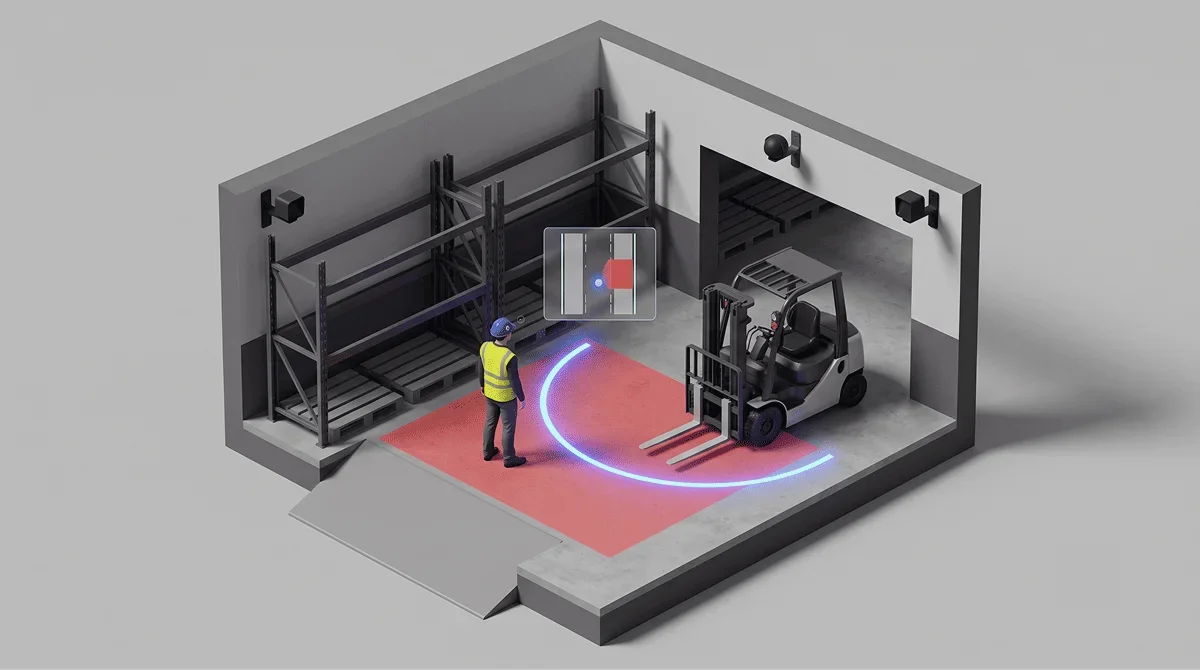
Forklift pinch-point collisions

The moment a person and heavy equipment share the same path, there's no way to warn anyone.

→ Hazard rule — alerts based on proximity between workers and vehicles

Entry into hazard zones

A barrier line alone can't catch an actual entry in real time.

→ Hazard rule — zone entry / exit / dwell-time overrun

After-the-fact response

Checking the CCTV happens after the accident.
That's a record, not prevention.

→ Hazard rule — after-the-fact review based on location history

Blind spots in management

Owners and safety managers have no way to see site conditions in real time.

→ Monitoring — see worker and equipment positions on the map in real time

605people
Fatal accidents in 2025
573 cases under fatality-investigation scope
286people
Construction industry
158 in manufacturing
351people
Workplaces with under 50 employees
More than half of all cases occurred at small sites
+14.5%
Increase at workplaces with under 5 employees
174 people, year-over-year

Source: Ministry of Employment and Labor, "2025 Industrial Accident Status — Supplementary Statistics on Fatality-Investigation Accidents" (provisional, as of March 31, 2026). These figures are official statistics illustrating industry-wide risk levels, not a measure of any specific solution's effectiveness.

WHY UWB

What makes positioning hard inside a factory is
metal and reflection

Steel framing, equipment, and stacked materials reflect and block radio signals. In this environment, what matters when choosing a positioning technology isn't catalog precision — it's what happens when the signal is blocked.

External research

Accuracy can be corrected even when blocked by metal

A study conducted at a shipyard workshop reported 1.93 cm of ranging accuracy after applying an error-compensation algorithm under metal-obstruction conditions. It means whether you compensate for it matters more than the obstruction itself.

Su, Y. et al. (2025). NLOS Identification and Error Compensation Method for UWB in Workshop Scene. Sensors, 25(21), 6555.
This figure comes from that study's experimental results, not from our own product's performance.

So here's the standard GrowSpace works to

We don't design to numbers measured under ideal conditions. We design to values measured on real sites with metal and reflection present. Anchor placement and compensation methods differ by site, and we size them during the site assessment.

Vehicles and workers moving between indoors and outdoors are tracked seamlessly across both, not by UWB alone.

THE CONSOLE

Not just a claim of "real-time" — this is the screen you actually see

Live worker and forklift positions, hazard zones, and alert history all appear on one map.
You see what's happening and where, without a single click.
This is the actual GrowSpace monitoring console. Draw hazard zones on your floor plan, and the moment a rule is triggered, alerts accumulate and the record stays.

LIVE · Building A Press Line
Hazard zone · Press #1Dwell-time limit · Material stagingW-04W-11W-07W-02W-19FL-2

This screen is an illustrative example of the product's interface; the zone names and numbers shown are not actual customer data.

ALERTS
Hazard zone entry
W-04 · Press #1 · Triggered
Dwell time exceeded
W-07 · Material staging · Time limit exceeded
Hazard zone entry cleared
W-11 · Press #1 · Cleared
DEVICE
Tag batteryNormal 18 / 20
Anchor syncConnected 12 / 12
Positioning dropout1 needs review

What you can actually do from the monitoring screen

It doesn't stop at showing you a picture. You set rules, keep records, and it all runs on our own servers.

Set up to 4 hazard rules per zone

Entry, exit, dwell-time overrun, and occupancy limit — turn on only the rules each zone needs. Alerts are logged as paired trigger-and-clear events, so there's a record of exactly when someone went in and when they came out.

When a device fails, the device tells you first

We continuously collect tag battery level and temperature, plus anchor connection and sync status. If a position signal doesn't arrive for a set period, that device is flagged as "needs review" — so you can tell whether it's quiet because the site is safe, or because a device is down.

Use your existing site floor plan as-is

Upload the floor plan file you already have (PNG, JPG, or PDF) and draw zones directly on top of it. There's no need to redraw anything.

You set your own data retention period

Decide how long to keep location, event, and device-status data, based on your site's own standards. When an incident investigation or internal audit requires it, you can export the raw data for that period.

Permissions are split by role

Access is split into three tiers — full admin, site manager, and general user — and sign-up requires an invitation and approval. You can open only the screens a partner company's staff actually need.

You don't have to send data outside your walls

Install it on a server inside your own factory and run it fully isolated from any outside network. Because some sites can't put worker location data on an external cloud, we've supported both deployment options from the start.

Curious what your own site would look like on this screen?

Just share your floor plan and hazard zones, and we'll tell you what needs to go where.

Request a Site Assessment →

IN THE FIELD

Where we've deployed this, and what it solved

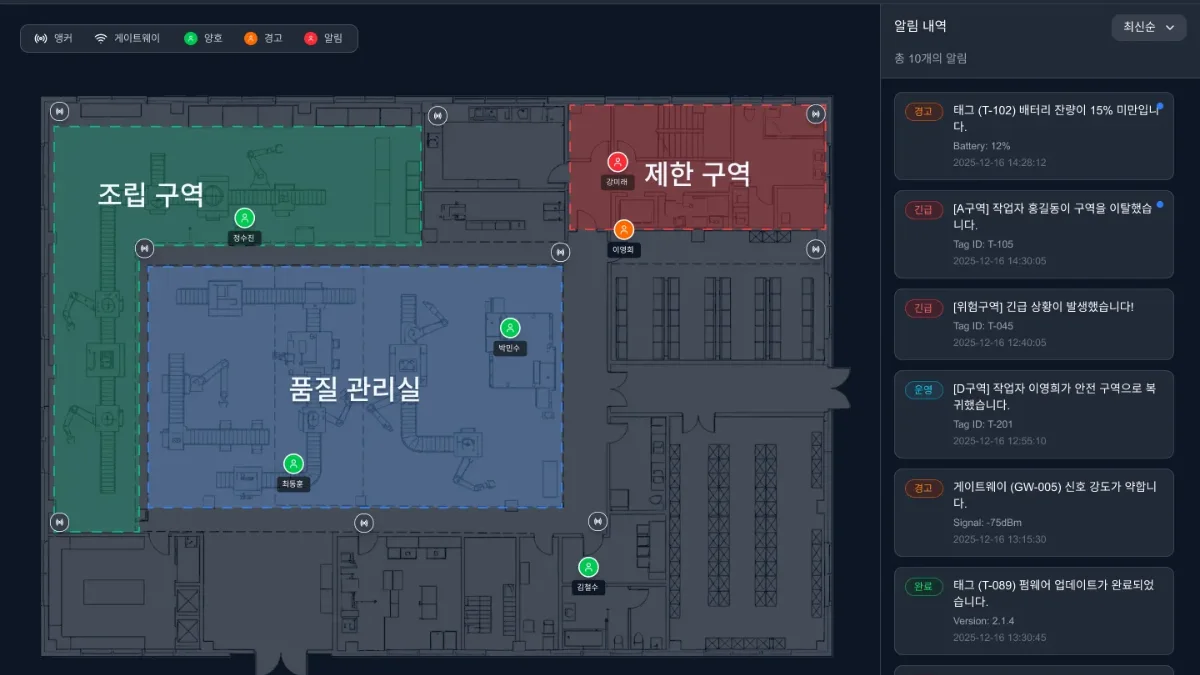
GrowSpace integrated control screen — assembly and restricted zone boundaries with zone-exit and proximity alert history
GrowSpace integrated control screen · zone boundaries and alert history
A major domestic steel manufacturer
Steelmaking · raw-material yard
Problem
While moving raw-material buckets, forklifts were misplacing them in the wrong zone instead of the assigned line.
Solution
Attached asset tags to the buckets and set up zone-based geofences.
What you can see
The moment a bucket is set down outside its assigned zone, an alert appears on the control room screen.

Instead of tracking down misplaced buckets later, the error gets corrected right where it happened.
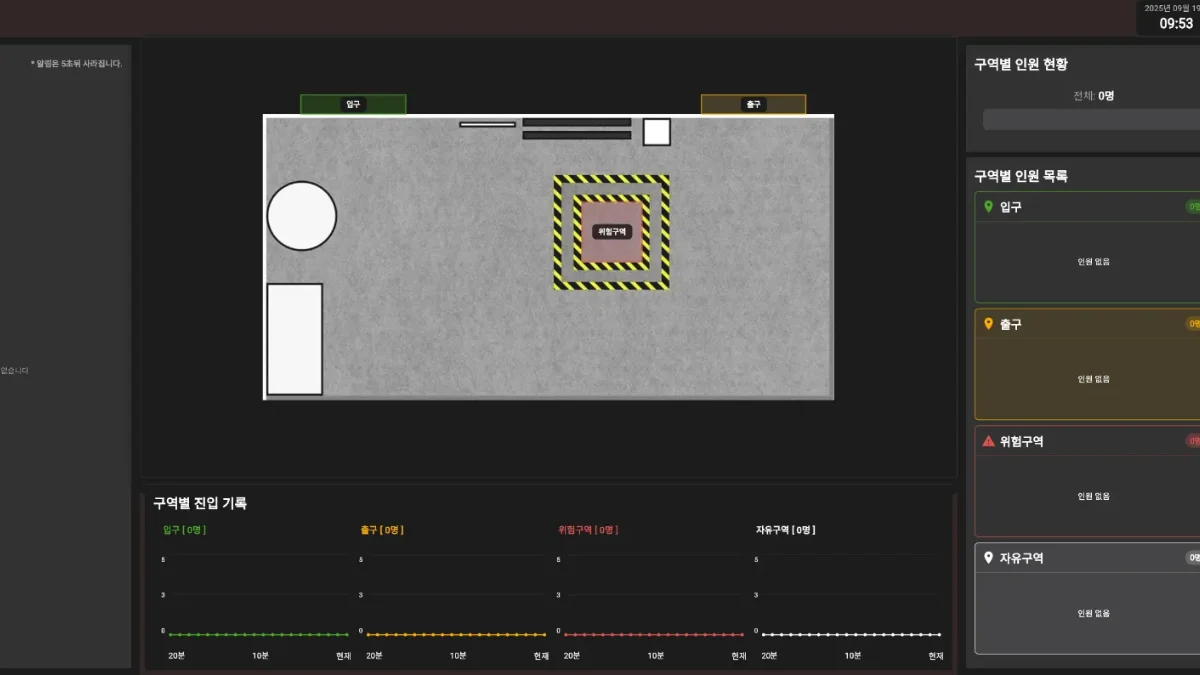
GrowSpace control screen — worker headcount by zone and a zone-entry log timeline
GrowSpace control screen · headcount by zone and entry log
A major construction contractor
Construction · semiconductor fab build site
Problem
With 300 workers on-site simultaneously for a semiconductor fab build, there was no way to cross-check the check-in roster against actual worker locations.
Solution
Applied personal worker tags with zone-based occupancy monitoring to track all 300 workers simultaneously.
What you can see
Headcount by zone, hazard-zone proximity, and automatic warnings on hazard-zone entry — all running live on the control screen.

300 workers tracked simultaneously · semiconductor fab build site

The time it takes to find out who's where after an incident is the same time it takes to respond.

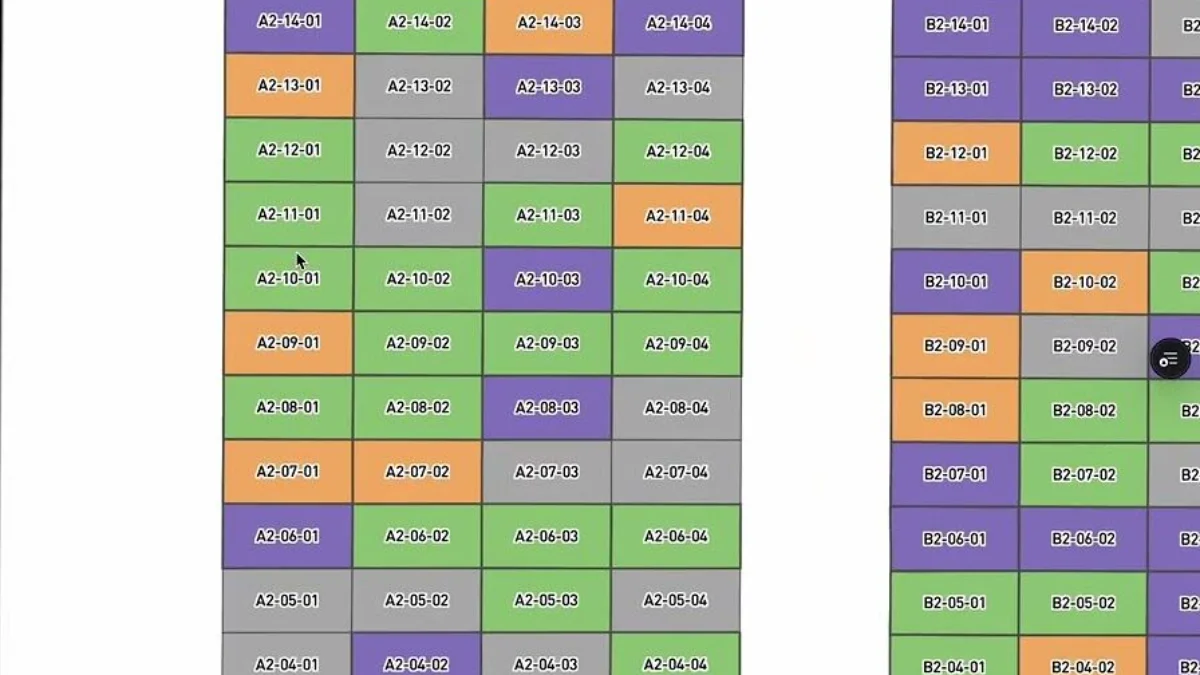
GrowSpace RTLS control studio — vehicle positions by slot in the outbound yard
GrowSpace RTLS control studio · vehicle placement in the outbound yard
A large domestic logistics company
Finished-vehicle logistics · outbound yard
Problem
Every time a vehicle moved between indoors and outdoors, tracking dropped out between the separate indoor and outdoor systems.
Solution
Combined indoor UWB and outdoor positioning into a single seamless indoor-outdoor tracking system.
What you can see
Vehicles moving in and out of the building stay tracked continuously on one screen, without dropout.

23.05 cm measured in the field · at a metal-dense outbound center

When indoor and outdoor systems run separately, tracking drops every time a vehicle enters or exits the building.

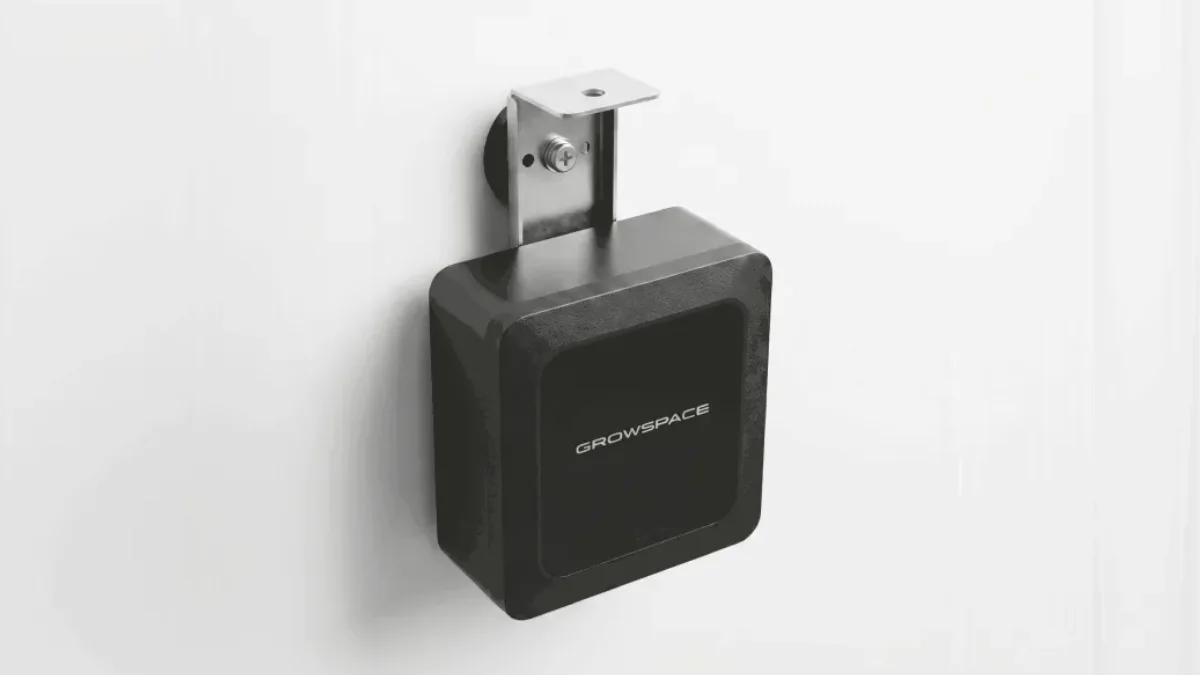
GrowSpace gateway — an in-house designed device mounted with brackets on site columns and walls
GrowSpace gateway · on-site installed device
A Daegu dyeing factory
Textiles/dyeing · wet process
Problem
Dense wet-process equipment and metal machinery caused heavy signal reflection, making positioning error easy to accumulate.
Solution
Applied indoor positioning together with a web-based smart map to place worker and material locations on the map.
What you can see
See which process zone workers and materials are in right now, and streamline work flow.

If it works on the worst-case site, it works on most sites.

* The images in each card are actual screens of the GrowSpace monitoring software and photos of our own in-house devices. They do not include any customer's actual operating data.

Ask us first
You're welcome to ask first whether this would work at your factory

It's fine if your floor plan isn't finalized yet. Just tell us your factory's size and which zones you want to manage, and we'll walk you through how similar sites were set up and whether grant funding applies to you.

FIELD CONDITIONS

"Our site is a bit different" — we'll tell you those conditions up front

Every factory has its own blind spots. We'll tell you upfront how we handle each condition, and exactly where the limits are.

When steel framing, equipment, and stacked materials block the signal

When a signal is blocked, the measured distance reads longer than it actually is. What matters is that this distortion only ever runs in one direction — a blocked path is never measured as shorter, because a detour physically can't make the distance appear closer.

So we don't rely on judging whether a signal is "currently blocked." Instead, we design the system to treat a lengthening signal with suspicion, and trust a shortening signal immediately — a structure that, if it errs, errs on the side of safety.

How many anchors, and where

At every point where a tag might be, at least 4 anchors need to be visible to calculate a 3D position. So installation design isn't "so many anchors per square meter" — it's mapping columns, equipment, and stacking heights onto the floor plan to eliminate blind spots. We look for overlapping coverage in areas that could get blocked from the start.

Power and wiring

Anchors receive both power and data over a single network cable (PoE), which minimizes the need for separate electrical work. But switch port count and power budget still need to be sized before installation — we check this together during the site assessment.

The transition zone between indoors and outdoors

Points where indoor and outdoor conditions meet — loading-dock shutters, yard entrances — are usually the first place tracking drops. We design this boundary zone with overlapping indoor and outdoor positioning, so tracking continues through the transition.

Dust, humidity, and temperature

The harsher the environment, the more often problems start with the hardware itself rather than the positioning. So we continuously monitor tag battery, temperature, and anchor connection status to catch issues early.

This is where the limit is

If a tag is completely enclosed in metal, no signal gets out at all — and no positioning technology can catch that, ours included. We flag these spots during the pre-installation assessment, reduce them as much as possible through anchor placement, and recommend covering what remains with an operating rule (slow-speed zones, guided movement, etc.) for the rest.

This is exactly why we don't claim to prevent every accident. It's better for both sides to agree upfront on what's visible and where visibility ends.

THE PLATFORM

UWB, CCTV, and IoT —
unified in one GrowSpace map dashboard

We add CCTV hazard detection and IoT sensor data to real-time UWB position monitoring,
for unified control of location, video, and environment on a single site map.

02 · CCTV

CCTV hazard detection · the footage flags danger on its own

When a camera on the map detects a hazardous situation, it shows up instantly on the control screen — not CCTV you review after the fact, but one that flags danger in real time.

03 · IoT

IoT sensors · catching even the risks you can't see

Environmental data like gas, temperature, and vibration is shown on the map alongside location, so anomalies are caught early.

UWB, CCTV, and IoT are unified into one map, one screen. Managers don't have to switch between systems — they see the entire site at a glance.

WHY GROWSPACE

Accurate even in a factory full of metal and reflection

About 23 cm

Average error measured on a real site with heavy vehicle and metal reflection — distinguishing workers from forklifts as individuals

23.05 cm average, measured at a metal-dense finished-vehicle outbound center
In controlled conditions: p50 about 4 cm / p95 about 10 cm
11

Patents held

Precision validated in the field

We publish both figures, not just a catalog number — about p95 10 cm in controlled conditions, and about 23 cm average on real sites with heavy vehicle and metal interference.

Seamless indoor-outdoor tracking

Combines UWB, GPS, and inertial sensors so
position doesn't drop when moving between indoors and outdoors.

Simple to install and operate

Works the moment it's powered on; maintained with over-the-air (OTA) updates.

Dedicated pinch-point protection (SpaceGuard)

Manages forklift and heavy-equipment pinch-point risk in real time.

HOW IT STARTS

Start with one zone, without stopping the factory

We don't roll out everything at once. We confirm it works in your single most hazardous zone first, then expand.

STEP 01

Site assessment

We review your factory layout, hazard zones, and the people and vehicles involved. An initial review is possible from a floor plan and photos alone.

STEP 02

PoC

We install anchors in the zones that need it and confirm real-world position accuracy and monitoring feasibility.

STEP 03

Deployment

We build out the anchors, tags, and monitoring system. Our own team handles installation on-site.

STEP 04

Integration & operation

We connect with your existing CCTV, IoT, or MES systems as needed, and continue supporting operations after deployment.

The number of anchors and installation method depend on site conditions. We size the exact configuration during the site assessment.

You can start with a single-zone PoC

Before committing to a full rollout, confirm it works in your single most hazardous zone first. We'll set the scope and schedule together during the consultation.

Discuss Your Scope →
GET STARTED

We'll review grant funding options together

Smart safety equipment grant programs

GrowSpace SpaceGuard may qualify for government or public grant funding. Eligibility depends on your site conditions and the program year, so we'll walk you through the available programs and procedures during the consultation.

Up to
80%
Government grant subsidy rate (varies by program and year)
01

Consultation & site assessment

Review hazard areas and deployment scope together.

02

Design & installation

Design anchor and device placement and install to fit your site.

03

Monitoring setup

Configure the map, hazard zones, and alert rules for your site.

04

Operation & refinement

Monitoring gets sharper as more data accumulates.

FAQ

What decision-makers actually ask

Does this work in a factory with a lot of metal structures?

It's true that steel framing, equipment, and stacked materials are the toughest condition for UWB. That's why we design against values measured under metal and NLOS conditions — not catalog numbers — and adjust anchor placement and compensation methods per site. Whether it actually works for you is something we confirm first during the site assessment.

We already have CCTV — why do we need this?

CCTV shows you the scene it happened to capture; a positioning system tells you who's where, as coordinates. The difference is that it can detect hazard-zone entry or approach as an event, without anyone having to watch continuously. We connect with your existing CCTV rather than replacing it.

How is this different from GPS?

GPS needs a satellite signal, so it's effectively unusable indoors or under a roof. UWB positions using anchors installed on-site, so it works indoors. For anything moving between indoors and outdoors, we configure seamless tracking across both.

Does it integrate with our existing MES, WMS, or IoT systems?

We build with integration in mind from the start. We don't replace the systems you're already using — we just feed the location data to wherever it's needed. Tell us what systems you use and we'll confirm integration feasibility first.

Can we install this in only part of the factory, not the whole thing?

Yes — that's actually the typical way to start. We recommend installing in your single most hazardous zone first, confirming it works, and then expanding.

Can we start with a PoC?

Yes. We install anchors in the zones you need and confirm real accuracy and monitoring feasibility first. The configuration used in the PoC carries directly into the full deployment.

Do we need to stop the production line during installation?

Anchors are mounted with brackets on columns, walls, or structures, and just need power and a network connection. It's not work that requires disassembling equipment or halting the line. That said, we'll coordinate available work windows based on your site conditions.

How long do the tag batteries last?

Since tags only transmit signals, power consumption is low. Actual battery life depends on the position-update interval and operating environment, so tell us your operating conditions and we'll estimate the replacement cycle.

What determines the cost?

The main variables are the area to cover, the number of anchors needed, tag quantity, and integration scope. Even for the same area, more metal structures mean more anchors. Share your site details and we'll give you a rough range first, with an exact quote after the site assessment.

Can small and medium-sized businesses also apply for grant programs?

We'll help you check eligibility for government and local smart-safety-equipment grant programs together. Consultation is available even before your budget is finalized.

See Your Site Before an Accident Happens

What your factory actually needs, and which government support programs you may qualify for

— we’ll check together during the consultation.

Information you submit is used only for consultation purposes.