
Thank you for checking out the UWB Q1 documentation.
GrowSpace UWB Q1 is an indoor Real-Time Location System (RTLS) development kit designed to precisely measure the position of people and objects inside a building and connect that data to other systems.
This guide walks you step by step through collecting indoor location data, visualizing it, and integrating it with external systems using UWB Q1.
It is written so that anyone new to RTLS technology can follow along easily.
What is UWB Q1?
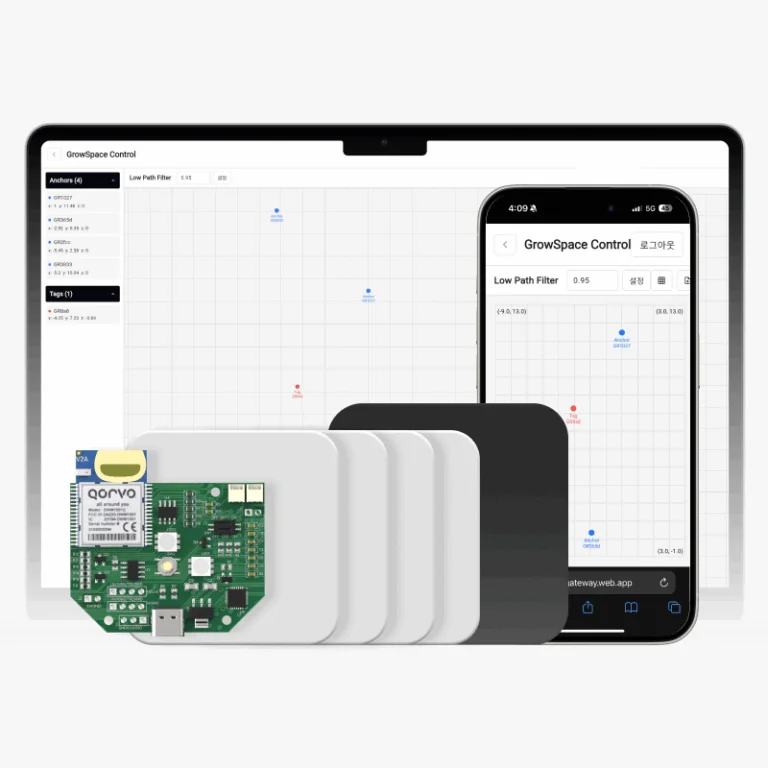
UWB Q1 consists of Tags, Anchors, a Listener, and a Gateway device. Using GrowSpace’s web-based configuration tool, you can set up a real-time location tracking system without any complex programming.
An Anchor provides a fixed reference coordinate,
a Tag transmits the real-time position of a moving object,
a Listener collects the tag’s position data and outputs it directly to a PC over USB (serial) for testing and development,
and a Gateway forwards the collected position data to a server or the cloud over MQTT.
The Listener and the Gateway are separate devices with different purposes.
Key Features
- Wireless real-time positioning
Track the location of people, equipment, and logistics assets in real time. - Web-based configuration
Connect and configure devices directly from the Chrome browser, no extra software required. - MQTT integration
Send data to external systems or the cloud simply by configuring the Gateway. - Floor-plan based visualization
Display tag positions visually on top of your actual site’s floor plan. - Scalable and practical
Suitable for enterprise field trials, exhibition setups, education, and research.
What Does This Guide Cover?
- How to connect the hardware and install drivers
- How to configure the Anchor, Tag, and Listener individually
- How to configure the Gateway and connect it via MQTT
- Real-time position visualization and floor-plan uploads
GrowSpace UWB Q1 is simple to install and intuitive to configure, so you can build an indoor positioning system without deep technical knowledge.
Follow the steps below to get started.